Platform
The current configuration reference is written for Klipper.
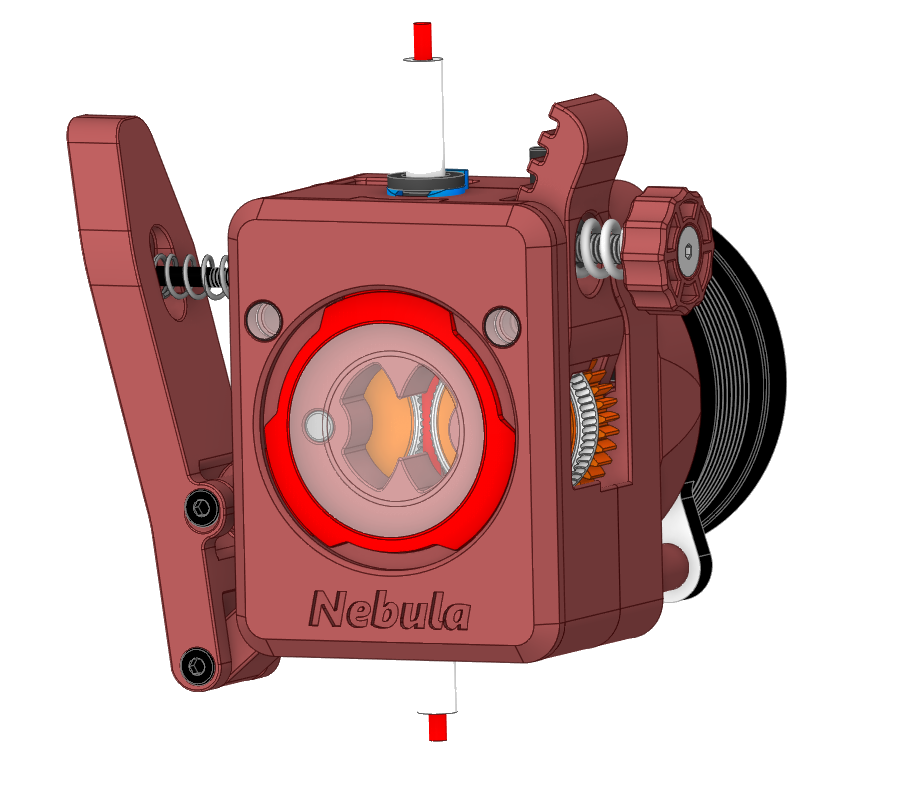
A CN3D-designed upgrade for the BIQU/BTT Nebula Extruder, developed around improved filament handling, sensing, serviceability, and an integrated cutter system.
Files coming soon: documentation is public now, STL files are planned next, and CAD/STEP files will follow only after final validation.
The repository includes a Klipper configuration reference for NebulaTor. It defines load/unload variables, extruder values, load/unload macros, neopixel setup, an unload button, and filament sensor behavior.
The current configuration reference is written for Klipper.
NEBULA_LOAD_FILAMENT and NEBULA_UNLOAD_FILAMENT handle controlled filament movement using shared variables.
The config documents rotation_distance 51.75, gear_ratio 11.25:1, and max_extrude_only_distance 200.0.
The development config uses gcode_button entries for the unload button and filament sensor.
Pin names in the repository are board-specific examples and must be adapted by the user.
The cutter is part of the hardware system; final public firmware behavior for release packages still needs validation.
The repository includes a Klipper configuration reference for NebulaTor. It defines load/unload variables, extruder values, load/unload macros, neopixel setup, an unload button, and filament sensor behavior.
The documented Klipper reference is organized around the extruder values, shared load/unload variables, the load and unload macros, NeoPixel setup, the unload button, and filament sensor behavior.
Core values documented in the current Klipper reference.
[extruder]
rotation_distance: 51.75
gear_ratio: 11.25:1
max_extrude_only_distance: 200.0
Distances and speeds are centralized before the macros use them.
variable_unload_purge_distance: 35
variable_unload_distance: 120
variable_load_distance: 40
variable_load_purge_distance: 70
The page documents macro purpose without publishing a final downloadable config.
NEBULA_UNLOAD_FILAMENT
NEBULA_LOAD_FILAMENT
[gcode_macro _NEBULA_VARIABLE]
# unload
variable_unload_purge_distance: 35   # (mm) purge a distance before unload to clean filament
variable_unload_purge_speed:    300  # (mm/min) purge speed
variable_unload_distance:       120  # (mm) unload distance
variable_unload_speed:          3000 # (mm/min) unload speed
# load
variable_load_distance:         40   # (mm) load distance
variable_load_speed:            1500 # (mm/min) load speed
variable_load_purge_distance:   70   # (mm) purge a distance after load
variable_load_purge_speed:      300  # (mm/min) purge speed
gcode:

[extruder]
rotation_distance: 51.75
gear_ratio: 11.25:1
max_extrude_only_distance: 200.0 # must be greater than the distance of the single segment above

[respond]
default_type: echo

[gcode_macro NEBULA_UNLOAD_FILAMENT]
gcode:
  {% set nebula = printer['gcode_macro _NEBULA_VARIABLE'] %}
  {% set unload_purge_distance = nebula.unload_purge_distance %}
  {% set unload_purge_speed = nebula.unload_purge_speed %}
  {% set unload_distance = nebula.unload_distance %}
  {% set unload_speed = nebula.unload_speed %}

  SAVE_GCODE_STATE NAME=tmp_unload_state
  G91
  G92 E0
  M118 Nebula unload purging
  G1 E{unload_purge_distance} F{unload_purge_speed}
  M400
  M118 Nebula unloading
  G1 E-{unload_distance} F{unload_speed}
  M400
  RESTORE_GCODE_STATE NAME=tmp_unload_state

[gcode_macro NEBULA_LOAD_FILAMENT]
gcode:
  {% set nebula = printer['gcode_macro _NEBULA_VARIABLE'] %}
  {% set load_purge_distance = nebula.load_purge_distance %}
  {% set load_purge_speed = nebula.load_purge_speed %}
  {% set load_distance = nebula.load_distance %}
  {% set load_speed = nebula.load_speed %}

  SAVE_GCODE_STATE NAME=tmp_unload_state
  G91
  G92 E0
  M118 Nebula loading
  G1 E{load_distance} F{load_speed}
  M400
  M118 Nebula load purging
  G1 E{load_purge_distance} F{load_purge_speed}
  M400
  RESTORE_GCODE_STATE NAME=tmp_unload_state

[neopixel nebula_neopixel]
pin: EBBCan:PD3 # RGB pin(marked as RGB on extruder), Modify this to match your mainboard!
chain_count: 2
color_order: GRB
initial_RED: 1.0
initial_GREEN: 1.0
initial_BLUE: 1.0

[gcode_button nebula_unload_button]
pin: ^!EBBCan:PB4 # Gcode Button pin(marked as GB on extruder), Modify this to match your mainboard!
debounce_delay: 0.02
press_gcode:
release_gcode:
  {% if printer.print_stats.state != "printing" %}
    {% set fs = printer['gcode_button filament_sensor'] %}
    {% if fs.state == "RELEASED" %}
      NEBULA_UNLOAD_FILAMENT
    {% endif %}
  {% endif %}

[gcode_button filament_sensor]
pin: ^EBBCan:PB3 # Filament sensor pin(marked as FS on extruder), Modify this to match your mainboard!
debounce_delay: 0.5
press_gcode:
  {% if printer.print_stats.state == "printing" %}
    PAUSE # [pause_resume] is required in printer.cfg
  {% endif %}
release_gcode:
  {% if printer.print_stats.state != "printing" %}
    NEBULA_LOAD_FILAMENT
  {% endif %}
# Board and pin names are controller-specific.
# Sensor and unload-button wiring must match the user machine.
# Pause/resume and NeoPixel behavior must be validated before release use.